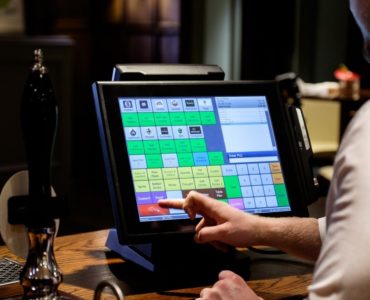
How to use a POS system in a retail store?

Running a retail store requires an array of skills in administration, management, and marketing. From ensuring that your inventory is stocked up to putting together monthly sales reports and summaries, these skills are necessary for your store to run smoothly.

Having an efficient Point of Sale system can go a long way, so you can rest assured that all your operations are centralized and work simultaneously.

What is a POS And How Does It Work in Retail?

The Point of Sale (POS) refers to the particular area in your store where customers pay for their purchases. The term is most often used to describe systems that keep tabs on financial transactions. Your POS could either be a cash register or a program integrated into your computer system that records and keeps track of the data that involves a business transaction to sell goods or services.

This system is beneficial to manage retail stores as it is the most reliable tool for a store owner to manage and evaluate the overall business performance. POS varies in types and some offer simple features that can be seamlessly integrated on any PC or online-based system. At the same time, some offer a fully integrated system with mobile capabilities. 

Retailers that invest the time and resources to administer such a system will reap the benefits. 

Key features of an effective POS System for retail stores

Here are some of the key features you should look for in a quality POS system for your retail store:

Sales Process 

The most crucial factor of a retail store is how fast it can provide service to the customers, most especially when it comes to paying for their purchases. Retails avoid jams and lines in your store. 

Barcode scanning is a key feature offered by POS that will make the payment process a lot quicker and more efficient. This feature will also help retailers categorize items and products. With just one scan of the barcode, the data can be keyed in as an accomplished sale.  

Sales Data

One of the key features of an effective POS system is generating accurate real-time reporting for you on your sales results. It should do daily, hourly and real-time reporting. Today’s POS system allows you to assess your sales performance in a yearly and dayparts. It should automatically analyze sales trends and provide you a business forecast based on those.

Inventory Management

In retail, cash is king. And the enormous ditch in retail cash performance is a fumbled inventory. A well-managed inventory system is a top feature your POS should be able to provide. It should be able to quantify inventory turnovers, sell-through rates, and even fill-in orders. A quality POS system will notify you when you are low on stocks and flag inventory that is not moving in your store. Your POS should also track down markdowns on certain inventories. 

A retail store should be able to perform an inventory count from time to time. Your POS solution should have a feature to conduct inventory count.

Customer Relationship and Experience

Many of the most successful retail stores have explicit knowledge of who their customer is, what they like and do not. Knowing your customers can give you a better idea of the kind of POS you should get for your business. 

POS systems store customer data and purchase history. This is a key feature that can improve your customer retention because it helps personalize the customer’s experience. When you are setting up plans for advertisement and marketing, the collected data will help you select the exact customers interested in your sale. 

For example, in a fashion retail boutique, it would be a waste of money to send a sale flyer for a markdown on oversize T-shirts to a customer who wears a size 2. POS data on customer profiles can’t help you avoid this kind of mistake.

Loyalty Programs

One of the best ways to optimize customer retention and entice recurring engagements to your retail store is an effective loyalty program. Studies have shown that customers are more likely to spend more money on retails with a solid loyalty program. 

Your POS system should be able to monitor these engagements for you. You may want to use the traditional punch cards to track their previous purchases, but it will be a whole lot better if your POS system can automatically track this for you so you can give the loyal customers their loyalty incentives. 

Employee Management

Do you have the right staffing and staff performance to boost your sales? Do you have the right software to help you organize efficient staff scheduling, monitor their performance, including clock in, and clock out? One of the critical components of a POS system is an employee management system. It should track employee hours and sales performance as well.

To help you track the sales performance and determine how productive your employees are, you can look at the metrics of each employee, indicating the number of sales made per hour. Imagine having four employees in your retail store all working the same time slots; how will you know which one is making the most profit.

Reporting

The POS system’s ability to be able to generate customer reports for you is a crucial feature. Your system will have a set of predefined reports that you can run and monitor. Still, you have to make sure that your system provides you the ability to customize and tailor the information to your analysis.

Look for a POS system that will show you weekly reports without you having to run it. Your sales report should also show your cost of goods sold, gross profit, margins, and tax, so you can better understand how much money is going back to your business.

The report is a key feature because it is a great way to give you a platform to analyze your sales performance. It gives you forecasts based on your sales data, helps you make decisions for improvements, and also gives you a chance to celebrate if you have reached your goal.

Integrations

Add-ons and integrations can extend the capabilities of a cloud-based POS system. This means you can link your POS to another platform, such as accounting software, e-commerce platforms, and payment processors, so that data flows seamlessly from one system to another. 

For instance, if you integrate a payment gateway to your POS system, it should sync well and talk to each other. If you sync your system to, let’s say, an online shopping cart, these two systems should be able to sync in your sales and inventory data so you can manage your stocks on both sales channels. 

Seamless integration allows you to make the most out of your POS system and helps you get a better grip on your overall business performance.

Multi-store Inventory Management

Multi-store Inventory Management is a critical feature if you’re running more than one retail store or if you have plans of expanding to more branches in the future. You want your POS and inventory management system to give you centralized stock control capabilities to have the ease of managing products from multiple stores and monitor sales performance in different locations from one platform.

A great feature of a quality POS solution is that it should be able to transfer stocks from one location to the next and generate reports for each store. This feature will save you the hassle of managing your stores from separate systems. So if you have plans of expanding your retail in the future, make sure you get a POS that can do everything from a single platform. 

5 Most Important Features of POS Systems to Improve your Business Operations

Point of sale (POS) systems are becoming the technology of choice for organizations looking to thrive in the cutthroat business industry. 

Grand View Research reveals that the POS software market surpassed $9.3 billion last year and will reach $18.1 billion by 2027. This increase can be attributed to its ability to automate sales processes, monitor inventory, and provide businesses real-time data and reports. It can also help businesses make quick and educated decisions to increase store profitability and reduce time spent on administrative tasks. 

Unfortunately, choosing the right POS system for your operations can be tricky with so many options available that are packed with dynamic features. To help you narrow down your choices and zeroing on a suitable solution, this article will dig deep into the key features of POS system. 

1. Inventory Management

Inventory management is perhaps the most significant reason why businesses are turning to POS systems. Managing inventory using manual processes and outdated systems is challenging, especially with customer demands continuously changing. 

A robust POS solution is brimming with powerful inventory management capabilities that let you manage stocks in real-time and determine the quantity of goods over a given period. 

This ensures that your business won’t carry any excess inventory that could bring several financial constraints and operational challenges. While there might be advantages to having excess inventory, holding excessive stocks may lead to your goods losing value over time as demand diminishes and product deterioration occurs. Using a POS system ensures that you have the right data to make an educated decision to prevent excess inventory and provide a seamless reordering process. 

2. Customizable Sales Reports

Sales reports are an integral component of effective business management. They guide business leaders in decision-making and pinpoint or solve identified issues that are slowing down operations. POS systems are brimming with reporting capabilities, but only a few can deliver customizable reports that let you filter the information using several factors. 

Thus, gathering information about POS software options is key to ensuring that your system allows you to customize reports. After all, business reporting won’t bring much of an advantage if you can’t get the right information immediately. A POS system with customizable sales reports makes it easier to weed through an avalanche of data so you can make quick decisions and free up more time to focus on revenue-generating opportunities.  

3. Customer Relationship Management

Customer relationship management (CRM) is one of the features of a good POS system. A POS system with CRM capabilities allows you to store, manage, and monitor consumer data and purchasing habits. This way, you can segment and organize customers by classifications and sub classifications to create more targeted campaigns and establish strong relationships. 

Listening to customers is one of the business lessons every entrepreneur should learn as it increases the potential for them to take action and improve the customer experience. A CRM-powered POS can also synchronize sales data, customer information, and other transactions in a centralized platform to enhance collaboration. This means you will no longer have to sift through folders and inboxes to find essential customer information, increasing productivity and overall efficiency. 

4. Employee Management

Industry-standard POS systems do more than keeping your cash flow running and serving your customers. It also helps manage staff and ensure that everyone is on the same page to enhance customer experiences and overall operations. Among the functions of point of sale system is to manage sales performance, employee hours, and staffing levels for seamless productivity monitoring. 

Its employee management module also lets you link transactions to each employee. This way, you can boost accountability among employees and prevent them from mishandling data. 

A POS system’s employee management feature can also determine strong and weak performers, making it easier for business leaders to conduct appropriate training to improve productivity and increase morale. 

5. Mobile App

The importance of mobile POS cannot be stressed enough with the growing competition in the business industry. As a business owner, you must be flexible in accepting payments on-the-go and quickly performing POS terminal transactions to increase sales and avoid losing potential customers. Modern POS systems provide service and sales organizations with powerful mobile apps that can simultaneously attend to several customers. 

This way, you can reduce wait times and make it easier for customers to pay, improving the shopping experience. A POS mobile app also promotes contactless payments, which are increasingly becoming the norm in the pandemic era. Adapting to the current changes and using modern POS systems with mobile app capabilities empower businesses to simplify the customer journey, enhance loyalty, and reduce associated costs. 

Improving Business Operations through POS Systems

Knowing why POS is important is key to improving operations and choosing a feature-packed solution that will drive positive business results. You can use the features mentioned above as a yardstick to finding a robust POS system or perhaps try CliqPOS.

CliqPOS is a mobile-friendly POS system that lets you manage sales, inventory, and employees. It boasts a CliqPOS API that allows you to develop custom integrations and connect with apps in the marketplace. CLiqPOS is available for free, but users can improve the software’s overall functionality by purchasing add-ons like integrations, advanced inventory, and employee management.
 

How to Beat Stress with a POS System

As a small business owner or manager, you face a lot of challenges throughout the day, enough to keep you up at night. Insufficient sales, debts piling up, not enough money, slacking employees, equipment and operations drawbacks- every aspect of your business has the potential to become a source of stress. 

All your problems and thoughts will be whirling around, making you tired and anxious. This is why it is essential for you to invest in the right tools to ensure the processes run smoothly while minimizing work on your side. 

POS system is one of the most important tools you must have in your business. It will save you a significant amount of time and money, so you can spend more time engaging with your customers and building your brand, rather than sorting through piles of cash register receipts and putting out fires.

Making the transition from an old-school cash register to a POS system can increase the efficiency on the front and back ends of your business, significantly shortening the list of things you are going to stress about. 

Here are our golden pointers for you to manage stress as a business owner and the powerful ways a trusted POS system will help you with that:

1. Remember what’s going incredibly well!

As you run your business, it is so easy to dwell only on the things that are going wrong. You can become even more stressed by focusing on the things that are lagging, underfunded, or broken. Remember that the grass is greener where you water it. The best way to improve stress management is by occasionally reminding yourself that despite all the challenges, things are going relatively well. 

Make a list of all your accomplishments for the day. Big or small, they all matter. Any small business milestone is a step closer to greater things ahead, so make sure to give yourself a good part in the back and celebrate your achievements. It’s a tough world out there, at least you have the choice to be kind to yourself everyday by not neglecting even the smallest accomplishments.

Back Office 

A modern POS has a good report and summary feature called the Back Office that can help you have a clear overview of your overall business performance. With the use of highly intuitive interface and neat visualizations with charts and graphs, you can have a complete overview of your business and how well you are doing. 

In the Back Office, you can check important parameters such as gross sales, net sales and gross profit. You can also determine which are your top selling products and categories, who are your best employees and which store is performing the best. Analyze your sales by different parameters and find out the trends and problem areas that you can work on to improve the performance of your business

2. Stop working hard, and start working smart!

Gone are the days when productivity and efficiency is defined by spending hours and hours completing a certain task, breaking a sweat, and pulling off all-nighters? Today, thanks to automations, it’s all about working smarter with the help of technology. And in the world of business, a trusted modern POS is the smartest way to get the job done as it streamlines all basic business processes by cutting wait times and reducing errors.

It’s so easy to get stressed and overwhelmed when you see the list of tasks you need to do. Fortunately, now you can let a POS take over in managing the most valuable aspects of your business such as your items, inventory, employees and customers. 

Inventory Management

One of the most time-consuming tasks is tracking stock and inventory. Thankfully, POS today has a powerful Inventory Management feature that can update your stocks in one click through purchase orders and also easily send orders to your suppliers. The system will automatically track it in the system and calculate the average price of received items. Find out more about this feature here and save your precious time: 

Remember, as a business owner your time is your most precious resource, your most valuable asset- spend it where it really matters. 

Loyalty Program

Having a Loyalty Program incorporated into your POS system significantly decreases the amount of time and effort that goes into manually inputting recurring engagements and customer data. Not only will you make your customers feel appreciated and valued with your special promos and loyalty offers, but you will also cut time in having to write all their details by hand or merely relying on your faulty memory to keep track of all your loyal customers that engage with your brand.

Remember, that it costs more to engage with new customers than to retain already existing ones. The main goal of your business is to keep your customers happy so that they keep coming back to your store. 

3. Take breaks and have some time for yourself

Hey, we get it- managing a retail business is a fulltime job. But no matter how hands-on you would want to be about running your business, you too deserve a vacation! Who says you need to be physically around in your shop 24/7 just to make sure everything runs smoothly? You, just like everyone else, deserve to take breaks and have some time to take care of yourself. Remember that your wellbeing is just as important as your business’.

With a cloud-based POS, you can still have a good grip of your business performance while being away on a retreat or taking care of other more important matters. With a POS Dashboard, you can have a good view and instant access to your store’s most important data. You can analyze your sales, and track inventory directly from your smartphone anytime, anywhere- in real-time, so that you can make important decisions immediately.

Do you sometimes feel that your employees seem to slack around when you’re away and that goals and targets are not met because of this? With real-time data right at your fingertips, you can find out who is performing well and who needs more training.

A good cloud-based POS allows you to better control your operations remotely by helping you monitor the various departments and how they are running even when you are away. So go on, and allow yourself the vacation that you deserve from time to time, and come back more refreshed than ever. 

13 Reasons Why You Should Let A POS Run Your Service-Based Business

If you’re a small business owner, you might be under the impression that a point of sale (POS) system only works for retail and food businesses. How about we tell you that the list of businesses that can benefit from a POS doesn’t end there? There are more than you may even realize!

Did you know that many service-based businesses reap the benefits of a POS by incorporating it into their business? Service-based businesses offer services instead of the usual food items or merchandise. If you’re a maintenance personnel, hairdresser, academic tutor, beautician, manicurist, pet groomer, interior designer, or massage therapist, then you are in the service industry.

Here are just some of the many immediate service-based businesses where a POS comes in handy: Hair salon, nail salon, spa, car wash and maintenance, laundry services, gasoline station, gym, photography services, bus transportation, public toilet, and massage therapy. 

Happy Clients, Happier Business

Let’s get down to your business’s ultimate goal. The purpose of your service-based business is to make your clients so satisfied with the service you provide that they’d want to keep coming back to you for the same experience. 

This means that, from booking an appointment to payment, you want to make sure that your clients’ experience with you is as seamless and hassle-free as possible. This way, not only will they leave your shop satisfied with your service, but they will go ahead and talk to their friends and family about your business. That’s boosted sales- and free marketing for you. To keep it simple, happy clients, happier business. 

The vital point in selecting a POS system that is highly customizable is to meet the ever-changing needs of your business and clients. This means your POS system can grow and evolve as the needs of your business do the same. 

If you’re wondering what features you should be watching out for in a POS solution that caters to these specific service-based needs, then you have come to the right place!

POS Features Ideal for Service-Based Businesses

1. Improved Customer Experience with Easy Service Selection and Check-Out Process

It’s not enough to only think about the service they booked with you, but you should also know what they expect from the whole process of availing the service from your business. Customers appreciate being able to seamlessly split checks, move their tab, switch rooms (if you run a spa or massage parlor), and pay in different payment modes. 

Say you run a hair salon; your clients will love being able to make a payment right from their seat while waiting for their hair treatment to be done. If you run a car wash, let your staff bring over a POS terminal so that busy dads can conveniently swipe their cards for payment in the comforts of your waiting room. A group of friends drop by your massage parlor for a group pamper day. You’d be able to split tickets or bills with just a few taps on your POS. And if some of them want to pay in cash and the others by card, your POS will make sure you don’t break a sweat.

With a sound POS system, be rest assured that as it streamlines the process from selecting the service of their choice to making payments, your customers are going to leave your store feeling satisfied. All thanks to the smooth and breezy transaction with a POS system, you can improve your customers’ overall experience with you.

2. Create Promos and Packages with Composite Items

Say a client walks in your waxing salon for a nice eyebrow thread, but as she glances at your service list, she is reminded that she has a beach trip coming up. On the spot, she decided that she would also want to avail waxing service for underarms, legs, and bikini. This is where the art of packaging your services comes into play. Service packages are a collection of individual services the company offers with a definite price availed as a set. 

With a POS’ composite item’ feature, you can easily create these bundles of services to be sold together as a unit. With the waxing salon example above, you can make a composite item and give it a creative name, say, “Beach Babe,” and this package will include eyebrow threading, underarms, legs, and a bikini wax offered at a reasonable (discounted) price altogether. 

If you have a car wash business, you may sell a service package that may include basic car wash, interior vacuuming, waxing, and buffing. With this, you can treat your clients by offering incentives like a free air freshener or coffee on the house as your clients wait for the service to be done.

By creating packages of your services, not only do you entice them to avail more services from you that meet their needs, but you are also relying on more than one session for your income. This is a great way to promote your other offerings or services and boost sales.
 

3. Track Materials and Items Used Per Service with Composite Items

Another way you can take advantage of the composite items feature is to use it to track the materials and ingredients used for a particular service. Say you run a pet grooming business. You can enter one of your puppy bath services as a composite item and include products such as shampoo, conditioner, and pet-safe cologne under it. You can even enter how much in quantity and volume is used up per service so you can track your stocks. 

If you run out of puppy shampoo, then that means you won’t be able to offer your puppy bath service until you have replenished your stocks. 
 

4. Customization with Variants

What makes a POS handy in service businesses is that it gives so much room for customization. On the item list of your hair salon’s POS, you can enter ‘haircut,’ and under that, you can set variants for different hair lengths offered at different prices.

Customization may also involve adding one-time effects to a service at the customer’s request. Say, you run a massage parlor, you can enter ‘Thai Massage’ on your item list and enter variants on this item that may include the options to choose ‘regular (no oil),’ or with ‘essential oil.’ Since the latter option requires additional oil, you want to offer this at a higher price. Use your POS’ variable feature to make this customization possible.

There are so many ways you can create variants with your POS. You can get as creative as you want to provide your clients with more options and freedom for customization. However you decide to do it, this is a great way to give your services an extra boost- both in promotion and sales. 
 

5. Open Tickets To Name Clients

The managerial challenge of offering service packages is keeping track of which clients have purchased which purchases. And this is why a POS comes in handy, thanks to its ‘open ticketing’ feature.’ This way, you can name a purchase to a client and only close it once the service is done and payment has been made. 

To put it simply, the open ticket feature is perfect for service businesses because it allows your clients to pay after the service is done. You can add the item to the ticket, name the ticket to your client, print the ticket, save the bill and give the bill to your client.

The client can come to you to make the payment, once the service is done. Only then can you print out a receipt to give to your client.
 

6. Boost Clientele Loyalty and Retention

A good loyalty program that rewards repeat customers can encourage them to keep coming back – and to spread the word about your business to their friends. With a POS, your loyalty program is integrated right into the system, tracking recurring engagements and creating a client database you can use in other ways. 

This is way better than a simple punch card that customers might lose or copy or not would want to carry around and occupy space in their wallets.

Think about it, say you want to get the word out about a new service promo drop for the summer. Your database of loyal clients is your most immediate and important tool. Email marketing, text blasts, and newsletters- there are just so much that you can do with your already existing clientele base. 

For this, you need a reliable service that offers basic features such as managing clients’ information and monitoring purchases of loyal customers. Integrations will even further enhance this with appointment and scheduling programs.

7. Speed

No matter what type of business you’re running, the speed and efficiency of your service are deemed of paramount importance. With limited time to maximize your chances of profit, moving through each step of the service availing process as quickly as possible is vital. Your POS should offer a seamless experience for both your clients and your staff. 

Remember, the more clients you cater to in your business, the more money you make. The last thing you would want is a POS system stalling that process.

Your POS can streamline the transaction process for your staff, which can help them move queues in the payment terminals more quickly. With a mobile POS, you can have one staff take advance service orders from clients in the waiting room so that the other staff can prepare the materials and tools to be used for the service. Another staff can focus on processing payments, which a POS will also streamline. 

Another way to modernize and fast-track the process is to hand a POS to your clients so they can punch in the service of their choice instead of having a staff manually write it down and running to a payment terminal. This eliminates errors and speeds up service. 

8. Inventory

With a simple inventory management system, you can manage and keep track of your inventory right from your POS, so you are fully aware of when, what, and how much to order from your suppliers. POS systems let you track products and tools used per service or as a whole by counting individual ingredients as composite items. 

It should also notify you when you’re running low on stocks. You should be able to track your products quickly and monitor which services they are used for. Not only will you have great insight into what’s happening with your inventory, but you’ll be able to communicate better when it’s time to place an order or if it’s time to cut back on reordering certain items.

In addition, when you keep an eye on inventory costs, you’ll be able to spot price hikes and know when to renegotiate with your suppliers or find new ones.

9. Trigger A Push for Bestselling Services

Your POS can also tell you which services in your item list are the most popular. Not only will you know which is the crowd’s favorite but which one is giving you the most profit! For instance, in the salon business, you might feel like your most acquired service is ‘hair coloring’ because you get a lot of good reviews on it. But what do the numbers reveal about how many are availed each day? How about the total cost to complete one hair coloring session?

Your POS may reveal that while this service sells well, it doesn’t profit you because the dye you use is expensive. It may have a higher cost than the other services you offer.

Although it may not seem like a popular choice, you could see through your POS report that your ‘hair spa treatment service’ is your most profitable service because it has a marginally lower cost. A little push in promotions and recommendations from your staff can easily increase the number of hair spa clients, which could boost your sales of a highly profitable service. 

10. Improved User Experience and Employee Management

Having your staff work in your business and use poorly-designed, outdated, slow software, can quickly become a significant source of frustration and major backlogs in their service and performance.

A POS system that is intuitive, easy to learn, and navigate can come in handy for an improved user experience. Suppose your POS has an Employee Management feature. In that case, your employees will be able to clock in and clock out right within the system, making it easy to check into work and get the ball running while improving transparency and accuracy. 

11. Seamless and Accurate Reporting

All in real-time, A POS can help you view what service was availed, who made the sale, and which payment method was used. It can also help you spot trends in past sales performance to make better decisions for your business.

Since your POS records every sale, it allows you to see extensive sales reports that give you a whole look at how your business performed that day. This way, you’ll always know if your business is in good shape or whether you have to work on brushing up your revenues or strategies.

You’ll be able to see which services sell best at what times and days and which ones are the most profitable. You’ll also have a sounder insight into how your staff performs, your actual labor costs, product costs, and the flow of new and regular customers.

12. Manage Your Business Anytime, Anywhere!

As a service-based business owner with a million tasks at hand every day, you can’t be physically present at your store 24/7. Isn’t it annoying when you only need to make a slight staff schedule adjustment or menu update, and you have to be physically present?

Thankfully, POS software can provide you with access to your data from any location, on any device. Whether it’s a service list update, a new promotional packaging, staff scheduling adjustment, or a sales issue, a POS that will let you handle it all in real-time, regardless of where you are.

13. Employee Restrictions and Security

In a world where lying, cheating, and for businesses, employee theft exist, we just have to do what we have to do to prevent that. 

A POS has customizable security settings that enable restrictions of what a specific staff member can do within the system, based on their position. For example, a cashier might be able to make sales but cannot view how much is currently in the cash drawer, alter a ticket, or give extra points to a customer without the manager’s consent.

When security settings are built into your system, that’s one less reason for significant anxiety and headache for you. Go for a POS software that will include automated data backups, customizable access controls, and data encryption to protect against employee negligence or theft. You’ll have peace of mind knowing your customer’s information, such as credit card numbers, is guarded.

Conclusion:

Just like every other business, a service-based business comes with its own sets of challenges and unique needs. A POS that addresses these needs is not just useful — it’s essential. You’ll want an organized and effectively synchronized system between your employees and your customers. And because it is so important to have excellent personal relations with customers in the service industry, software that keeps track of each customer to create effective marketing strategies can be a fantastic service solution.

10 Reasons Why A POS Will Improve The Way You Run Your Restaurant

The holiday season is fast approaching signifying the busiest time of the year for those in the restaurant business. People are not just loosening their belts to give way to all the delicious holiday dishes, but also their wallets. It’s the perfect time for restaurants to go full-throttle as the go-to venue for people to celebrate.

However, this doesn’t go for all in the industry. Without the right tools and automation to optimize your business performance, you may just be seeing yourself in another lost opportunity this holiday season. This is where a reliable POS system comes in very handy. 

In an industry as expeditious and competitive as the restaurant industry, regardless of your business size, having a point of sale (POS) software system that can keep up is a game changer. Fortunately, modern POS software has evolved into a tool that makes every aspect of the restaurant business, from customer to user experience and administrative responsibilities, smooth-running and more efficient.

Foodservice businesses from food trucks to fast food joints to fine dining restaurants are making the most out of their POS as the primary operations hub for smooth-sailing operations.

What is a Restaurant POS?

A POS for your restaurant is a hardware and software system that work together to optimize workflow and transactions for the foodservice industry.

Most people hear the term restaurant point of sale (POS) and think of a cash register for customer transactions. Punch in order or purchase, accept payments, and buh-bye. Fortunately, today, a restaurant POS is capable of so much more than just taking orders! It can help you boost your sales, improve the guest experience and customer retention, and help you make smarter decisions to run your business.

A modern restaurant POS can help your business thrive in three main ways:

  • Increase your sales
  • Improve your guest experience
  • Inform your business decisions

As you select the best POS for your restaurant, there are some crucial points to consider. Consider how a new system will affect your customers, staff, and profitability. 

Pay close attention to the following areas where your POS can come into play:

1. Customer Experience

The goal of your business is to keep customers happy and keep them coming back for more. Perhaps even recommend it to their circles. A POS system significantly improves customer experience. Customers appreciate being able to seamlessly split checks, move their tab, switch tables, pay in different payment modes – and an added bonus, being able to make a payment right from their seat through the server’s tablet.

These are all made possible by a POS. With a sound POS system, you are rest assured that as it streamlines the process of taking orders to making payments, your customers are going to leave your store feeling satisfied. All thanks to the smooth and breezy transaction improving the overall customer experience. 

2. Boost Customer Retention and Loyalty

A good loyalty program that rewards repeat customers can encourage them to keep coming back – and to spread the word about your business to their friends. With a POS, your loyalty program is integrated right into the system, tracking recurring customer engagements and creating a customer database you can use in other ways. (Hint: Email and text blast marketing, newsletters)

This is way better than a simple punch card that customers might lose or copy or not would want to carry around and occupy space in their wallets.

3. Speed

No matter what kind of restaurant you’re running, the speed and efficiency of your service are deemed of utmost importance. With a very limited time to maximize your opportunity to earn, moving through each step of the dining process as quickly as possible is vital. Of course, not to disregard offering a seamless experience for customers, wait staff, kitchen staff, and managers. The last thing you would want is a POS system stalling that process.

Remember, the more customers you serve, the more money you make.

Your POS can simplify the transaction process for your staff, which can help them move queues in the payment terminals more quickly. With a mobile POS, you can have one cashier take advance orders from a long line so that the kitchen or baristas can get started on them while the other cashier processes payment.

A mobile POS enables your servers to take tableside orders as well. Tableside ordering is a big deal because all your servers need to do is punch in the order once at the table instead of writing it down and running to a payment terminal. This significantly eliminates errors and speeds up service. A server’s product knowledge is more consistent because they can carry it around with them – no more running back to the kitchen with questions about ingredients or allergy alerts. It’s all right there.

Did you know that some restaurants have experienced sales increases of 20% or more after implementing tableside ordering?

4. Kitchen Display Systems

A great POS that will completely step up the way you run your restaurant is one that is equipped with a kitchen display system (KDS). As soon as your servers punch an order into the POS, this feature will automatically flash it right in the kitchen display system, where your kitchen staff can see everything at a quick glance. 

This definitely eliminates some of the more frustrating elements of using the traditional order printer. Simplifying and automating communication between servers and kitchen staff will save you not only paper but staff time, reduce wastage, and decreases the chances of duplication of orders.

Kitchen Display System comes especially handy, especially in quick service environments where the business models are all centered on serving customers quickly. Imagine taking orders directly from table guests, which will automatically update back to the kitchen, no time wasted!

5. Inventory

With a simple inventory management system, Manage and keep track of your inventory right from your POS, so you are fully aware of when, what, and how much to order from your suppliers 

POS systems let you track menu items as a whole or by counting individual ingredients as composite items. It should also notify you when you’re running low on your top sellers. You should be able to easily track your ingredients and products and monitor where all of it goes. Not only will you have great insight into what’s happening with your inventory, but you’ll be able to communicate better when it’s time to place an order or if it’s time to cut back on reordering certain items.

In addition, when you keep an eye on inventory costs, you’ll be able to spot price hikes and know when to renegotiate with your suppliers or find new ones.

6. Trigger A Push For Best-Selling Menu Items

Your restaurant POS can also tell you which items in the menu are your best sellers and give you the most profit! For instance, you might think your best dish is your Chicken Pesto Pasta because you get a lot of good online reviews on it. But what does the data reveal about how many are sold each day? How about the total cost to make each serving? 

Your POS can reveal that while this dish sells well, it doesn’t do much for your profit because it’s expensive to produce. It may have a higher cost than other items on your menu.

Through your POS report, although it may not seem like a top seller, you could see that your pizza is your most profitable menu item because it has a marginally lower cost. A little push in promotions and recommendations from your servers can easily increase the number of these pizzas sold, which could boost your sales of a highly profitable item.

7. User Experience

Let’s face it. Today, even the youngest and oldest of ages are taking advantage of advanced software in some way (tablets, smartphones, smart TV, Smartwatches, etc.) Your staff too use cutting-edge software in their personal lives. Having to work at your restaurant and use poorly-designed, outdated, slow software, can quickly become a significant source of frustration, and worse, create a backlog in their service and performance.

A POS system that is intuitive, easy to learn, and navigate is essential for a better user experience. Your employees will be able to clock in and clock out right within the system, making it easy to check into work and get the ball running while improving cash drawer transparency and accuracy.

8. Reporting

A POS can help you view what was sold when it was sold, who sold it, and which payment method was used, all in real-time! Not only that, but it can also help you identify trends in past sales performance so you can make better decisions for your business.

You’ll be able to see which products sell best at what times and days and which ones are the most profitable. You’ll also have a sounder insight into how your staff perform, your actual labor costs, food costs, and the flow of new and regular customers.

Since your restaurant POS records every sale, it allows you to see extensive sales reports that give you a whole look at how your business performed that day. This way, you’ll always know if your business is in good shape or whether you roll up your sleeves on improving your revenue or strategies.

Your POS is a hub of information, collecting a wide variety of datasets that you can drill into and compare: month to month, year over year, or for special occasions like Christmas or Thanksgiving.

9. Owner’s Portable Accessibility & Control

As a restaurant owner with about a million tasks at hand every day, you can’t be physically present at your restaurant 24/7, but with an outdated desktop-only system, you might feel like you have to be. That’s an incredibly annoying problem when you just need to make a slight staff schedule adjustment or menu update, and you have to be physically present.

Thankfully, POS software can provide you with access to your data from any location, on any device. Whether it’s a menu update, a scheduling adjustment, or a sales issue, go for the POS that will let you handle it all in real-time, regardless of where you are.

10. Staff Restriction & Security

In an ideal world, there is no such thing as lying, cheating, and for businesses, employee theft. Ensure that customers have paid for any stock or inventory headed out the door.

Did you know that about 75% to 85% of all restaurant theft cases are committed by their own staff? Theft can account for up to 4% of your overall sales.

A restaurant POS can help counter employee theft and tighten security, increasing actual sales. First, A POS makes sure that all ordered items are tracked. For example, to get a burger from the kitchen with an extra pattie, your staff has to enter it into the POS.

Second, a POS has customizable security settings that enable restrictions of what a specific staff member can do within the system, based on their position. For example, a cashier might be unable to access how much is currently in the cash drawer, alter a bill, or give extra points to a customer without the manager’s consent.

When security settings are built into your system, that’s one less reason for significant anxiety and headache for you. Modern POS software will include automated data backups, customizable access controls, and data encryption to protect against employee negligence or theft. You’ll have peace of mind knowing your customer’s information, such as credit card numbers, is safe.

7 DISCOUNT PRICING STRATEGIES FOR RETAIL BUSINESSES

Every customer loves buying products at a reasonable price. It is the reason why different discount pricing strategies are often widely-used by retailers to attract more consumers and boost sales. However, pricing your items correctly is a tricky balance. A cheap price isn’t always the best option, since the product may generate a steady stream of sales without making any money. To tackle the problem, this blog will provide the top 7 discount pricing strategies for businesses.

Benefits of discounts

Discount is a great method to get customers into your business quickly. You’re more likely to attract a customer’s attention if you tell him he can save money. In fact, a survey conducted in the USA shows that 88% of customers used a coupon while shopping in 2021.

Discounts benefit not just your customers, but also your business. You can clear up space in your warehouse by discounting products. It’s possible that items you don’t intend to sell will sit in your store for months. By lowering the price, you improve the likelihood that they will be sold.

Moreover, a company’s image may improve if it gives discounts to particular groups of people, such as the elderly or those in the military. When a business offers discounts to those who are in tough situations or who may be experiencing financial difficulties due to a lack of income, it demonstrates that the company is responsible for catering to the community.

Top 7 discount pricing strategies

Now that you know the importance of promotion plans for businesses, let’s look deeper into the best strategies.

Manufacturer suggested price

Manufacturer suggested price is a sticker price suggested by a manufacturer of a product to retailers. It is commonly used for mass-produced commodities like consumer electronics or household appliances. The purpose of it is to unify the pricing of products sold across various retail locations.

However, offering some items at the manufacturer suggested price might reduce your competitive advantage on certain products. After all, how can you differentiate yourself if you provide the same item at the same price as other retailers? Sometimes, to clear out inventory faster or to attract more customers, many merchants may sell items below the manufacturer suggested price. It is then up to each retailer to remain flexible in different situations to make use of this pricing strategy.

Bundle pricing

Sell a bunch of items for a single price, such as three-pack socks or five-pack earrings, is bundle pricing. It simplifies retailers’ marketing efforts because they just have to promote one price point rather than multiple. At the same time, customers also enjoy package offers since they think they are receiving more for their money. 

H&M is a well-known example of bundle pricing. This fashion retailer continuously places bundles of socks, gloves or jewelries near the checkout counter to draw customers into purchasing these groups of items. By doing so, they encourage customers to buy more items with reasonable pricing, thus boosting sales.

Discount pricing

Discount pricing, as the name implies, is the practice of selling items at a reduced price. It can happen whether through sales codes or coupons delivered directly to customers, in-store discounts, or even store-wide markdowns. Although merchants dislike the concept of discounting products because it reduces their profit margins, having a discount at special occasions can help you attract new consumers who are searching for a bargain.

If you are planning to offer discounts, here is a useful tip. A 50% increase in quantity is equivalent to a 33% reduction in price. However, bear in mind that if you give discounts too frequently, clients’ perceptions of your brand will be lowered, and they will be less likely to pay full price for your goods and services.

Channel-based pricing

Channel-based pricing is a relatively new technique that applies to omnichannel merchants, or those that sell their items through several channels such as a physical shop, a website, and social media accounts. This approach allows businesses to charge various prices for the same product depending on where it is sold.

Channel-based pricing may be a strong motivation for customers to select a specific channel. It is useful for merchants wanting to promote one channel over another, such as to boost their e-commerce operations or to bring more people into stores.

But how can omnichannel merchants handle different prices at the same time? The answer is a point of sale (POS) system. Using a POS system on the market nowadays, with CLIQPOS being an outstanding example, retailers can easily sync data between multiple selling locations. You can customize and save data at different registers and manage them from anywhere. For this reason, we would recommend using POS systems for channel-based pricing.

Penetration pricing

Penetration pricing is the practice of initially primarily keeping product prices low in order to promote the brand and its products to as many people as possible. It is often chosen by newer businesses that are about to join the market. By encouraging consumers to spread the word, merchants may save money on advertising and customer acquisition in the long run.

Netflix is a great example of how market penetration pricing may be used to knock out a big competitor. DVD rentals were popular in the late 1990s and early 2000s. For the $15.95 subscription option in 2000, Netflix subscribers may rent four movies at a time with no return deadlines – a real bargain at that time. This encouraged customers to test their new service and has led to the success nowadays.

Competitive pricing

The technique of using your rivals’ prices as a standard and lowering your prices is known as competitive pricing. Retailers who use this method seek to compensate for their lower profit margins by boosting total sales volume. This strategy might be suitable for big brands with high levels of transactions. For smaller companies, the only option to keep this practice going is to sell large quantities of the goods. Depending on the product, it may lead buyers to believe that your brand is a cheaper alternative to other brands. Therefore, retailers should pay attention to this.

Premium pricing

When you choose to sell your products at a greater price than the competitors, this is premium pricing. This strategy, when paired with the proper marketing methods, may help your company be seen as “premium” or “luxury.” Rolex is an excellent example of a brand that has successfully used a premium price strategy. If you only need a watch to tell time, you can get one for $28. However, many buyers are willing to pay $10,000 for a Rolex because they believe the product is of exceptional quality and serves as the ultimate status symbol.

The only concern about this pricing plan is premium pricing may or may not be the best option depending on your target client group. However, if you are seeking to make your brand become a ‘luxury’ name, consider this strategy for success.

Wrapping up

All in all, we hope that this blog can broaden your mind about the top 7 tips to execute discount pricing strategies. With CLIQPOS, you can level up your business with many powerful omnichannel features. Let’s talk about how we can help!

How to Clean and Sanitize POS Equipment

There are important Do’s and Don’ts to keep in mind when sanitizing your point of sale and payment hardware.

Do not:

  • Spray your POS equipment directly (Spray onto a cloth, first!).
  • Use a touch screen before it dries.
  • Use alcohol-based cleaners on screens. (Use a solution made for device screens!).

Do:

  • Use a soft cloth to wipe down screens.
  • Wipe the dust off the screen before sanitizing.
  • Wear gloves when cleaning.
  • Use a stylus instead of a touchpad, when possible.
  • Encourage contactless payments.

These cleaning and sanitation steps apply to everything from your tablet screens to your payment devices.

For smaller devices, like credit card keypads, you can use a cotton swab to clean those nooks and crannies.

How often should you clean POS equipment?

It’s normally recommended that all POS equipment is wiped down on a daily basis. However, the covid-19 pandemic may require your team to sanitize your point of sale hardware much more frequently, especially for federally-deemed “essential” stores with heavy traffic.

To ensure the safety of your employees and your customers, POS equipment should be cleaned hourly.

Some retailers have even set up rotating cleaning stations that sanitize POS devices each hour. A clock-in software can help ensure employees keep up with cleaning schedules.

As a store owner, you may be concerned that frequent POS cleanings may be disruptive to the sales process. Health and sanitation is a priority until Covid-19 is under control; we’re willing to bet that your customers would prefer the hardware they interact with is actively sanitized.

Have any questions on how to sanitize your POS equipment? Contact your hardware provider for recommended point of sale hardware cleaning processes and hardware-approved cleaning products.

Remember: properly cleaning and sanitizing your POS equipment also has the added benefit of prolonging the hardware’s lifespan!

HOW POS SUPPORT BUYING BULK ORDERS

HOW POS SUPPORT BUYING BULK ORDERS

Buying bulk items involves more than just stocking up on toilet paper, contrary to common assumptions. While it may appear to sell thousands of good deals with unbelievable prices, retailers need to know how to use POS to meet the customers’ requirements during this crazy shopping time.

Buying in bulk entails purchasing big amounts of a single commodity at once. For example, you can buy ten boxes of batteries at once for a fraction of the cost of buying them separately.

While it may appear that the purpose of buying bulk items is to acquire as much as possible for the least amount of money, the fact is that your primary goal should be to reduce your cost per unit. You can simply compare pricing between brands and merchants this way.

For customers, they will need a lot of information about promotions to know when is the best time to buy thousands of items. So it’s a lot better if your store is running a POS which is 24/7 ready online and offline. 

With customers

Various payment methods

It is not a good idea to force the buyers, without any other option, to use their credit cards. Knowing how to budget is an important part of learning how to buy in bulk for the shoppers. Bulk purchases can save money in the long term. 

Many customers have calculated a lot in advance and spent a certain amount of money on all the items they plan to buy. Let them pay in the way that best suits their plan. Also for the shop owners, multiple payment methods can save a lot of time and effort. 

Use available coupons

When buying bulk items, coupons might save quite a lot of money. So it is preferable to have some promotional coupons, presented on the online POS. Customers will love the experience of taking a few minutes to look for coupons online or in the store catalog before entering a shopping trip. And what’s even better is that they can save a couple of coupons and combine them with an in-store discount to obtain great value.

For retailers

Inventory management 

When the number of customers who love buying bulk items does not decrease, while the number of products needed to sell is extremely large, the shopkeepers need to carefully keep track of orders and stocks. Therefore, a POS system, which can scan barcodes and update data from both your online and offline businesses, is the first solution to control inventory. 

Instant data update 

Retailers might find it perfect to run their store when Orders, Inventory, Customers, and Products are all automatically updated between the POS system and website. Many POS systems support both online and offline states, so even when not connected to the internet, the store managers still can execute some basic tasks offline. After that, data will be updated when the Internet connection is back.

CLIQPOS is a software with all the above features, not to mention the stock numbers that are automatically updated cross-warehouse, or the suggested design layout for optimum warehouse arrangement sites.

Conclusion

To handle the buying bulk time, every merchant needs to choose the most suitable POS for their store to get the highest revenue. If you are wondering about this issue, call us immediately to get informative advice and the best solution.

Smart Ways To Secure Your Point-of-Sale System

The digital world has grown into an expansive universe that helps businesses thrive and reach customers quickly and effectively. Despite this exponential increase in productivity, there are those who seek to harm others on the web. Hackers are out for a quick buck to exploit people’s personal information. To avoid these problems for your business and your customers, here are a few smart ways to secure your point-of-sale system.

Cybersecurity Measures

When you want to secure a point-of-sale system, you must begin with the system itself. No software that connects with the web is safe from attack. While you may believe your business is too small for a hacker to go after, think again. No one can anticipate a hacker’s targets, and malware can quickly download to your computer if you accidentally click a link to a shady website.

Malware Protection Software

Antivirus software is one of the easiest and most applicable methods for securing your digital work. Malware is the harmful software that hackers use to infiltrate your system. If you use effective and well-regarded antivirus software, you won’t have to worry about malware. Depending on your operating system, you may need to download the malware and have it run in the background to protect your business and customer data.

If you download malware protection software to your system, you will need to check in on a few things. First is the coverage the software provides and how it alerts you to the presence of a threat. You will also need to watch for software updates and product changes, so you always have the best protection for the newest risks. The other thing you’ll want to watch out for is the payment frequency. Does the third-party software require monthly payments, or can you pay in annual installments? The last thing you want is to forget about next month’s payment and lose the protection you so greatly rely on.

End-to-End Encryption

Encryption is a way to turn data, like budgets and emails, into randomized information that outsiders cannot read. In general terms, end-to-end encryption is a communication system where only users who directly interface can access messages and information. You will need encrypted information in a business setting to keep your records secure from prying eyes.

Suppose you run a point-of-sale system that collects and uses customer credit card information at purchase. You need credit card information to receive payment for your products and services, but you cannot bypass the need to use that specific information digitally. So, you can use end-to-end encryption that will protect customers’ credit card information the moment the system receives it and when it sends the data to the server. This means you and your customers’ data will never be vulnerable.

Passwords and Protections

A POS system for restaurant, retail, and hotel operations requires unique access for every individual in the organization. Entry-level employees and managers alike must use the same system to complete their daily tasks. However, a low-level staff member shouldn’t have the ability to edit company records or financial books. Instead of using separate tools for each person in the operation, you can select protections and admissions for each person in the system. This way, managers can enter a password or swipe their password card to access certain functions that remain separate from other employees and anyone else accessing the system.

You have sensitive information about your business that could ruin your enterprise if it fell into the wrong hands. While most employees are upstanding people you hired to get the job done, there are those with sinister intentions and no accountability. Are you worried about what your employees might do when no one is looking? If so, you should check out our retail accounting software at Business Software Solutions that tracks all password uses and employee logins, so you know who is doing what, and when. You can also reconcile the cash in the drawers with the number your system reports that you should have at the end of the day.

Physical Security Options

While you primarily use POS systems in digital spaces, this software runs on unique hardware. Safeguarding against digital threats is one thing; protecting against physical ones is quite another. Depending on your business’s size, scale, and location, you may need more or less of these security measures. However, they are vital to have in place before something bad happens.

Use CCTV Security Cameras

When you have valuable equipment in your store, you do not want people tampering with it or stealing it. That is why security cameras are a great deterrent and backup option to keep visitors accountable. These cameras run twenty-four-seven to capture every moment at every angle. If you install this tool, be sure to find CCTV cameras.

CCTV stands for closed-circuit television, which means that the video stream from the cameras is only accessible to a handful of monitors within your designated system. A single set of wires transmits the signal to your monitors and a single set of storage devices that hold all the recordings. Since there is no interaction with the internet, no one can access this video feed unless they are on-site. While people can still tamper with your equipment, it is impossible to do so remotely.

Locks and Keys

Locks and keys are old yet reliable methods for protecting valuables. You can secure your POS system by looping metal wire rope through an external part of your hardware and connecting it to an immovable object on the other end. For example, you can connect your POS touchscreen monitor or cash drawer to the checkout counter, making it an anchored piece of your building. You can add a lock to the open end of the wire rope and keep the keys safe on your person.

If you keep these smart ways to secure your point-of-sale system in mind, you can fortify your business physically and digitally. It would be best to prepare and implement your plans now before something unfortunate occurs. If you have any questions about point-of-sale systems or would like to know more about the security measures we offer, reach out to us at Business Software Solutions today.

How To Increase Restaurant Delivery Sales

Recently, restaurants have been forced to innovate and get creative with the way they sell their food. One of the most popular and influential of these innovations is the incorporation of food delivery services. But what are the best ways to make deliveries a more significant aspect of your restaurant? Learn about how to increase restaurant delivery sales and find out.

Build a User-Friendly Menu and SEO Optimized Website

If you’re trying to figure out how to increase restaurant delivery sales, you should start with your website and menu. Because food deliveries often entail going online, it’s crucial to ensure that your business’s website is visible to the virtual masses. For this reason, it’s wise to build your website with SEO (search engine optimization) best practices in mind.

SEO can help you ensure that more people are visiting your website and subsequently ordering food from it. Additionally, you’ll want to ensure that ordering food is simple, quick, and streamlined once customers reach your website. You can do this by crafting a menu that is as user-friendly as possible, with intuitive navigation tools and well-organized sections.

Provide Excellent Delivery and Customer Service

Similar to other aspects of business, increasing deliveries has a lot to do with the efficiency and quality of your service. So, if you’re looking to make food delivery a more prominent feature of your restaurant, you should establish best practices for each delivery to help ensure that your customers will want to continue receiving deliveries from you. Make sure you have processes in place to ensure the quality and freshness of each order, such as having coolers to help food travel better.

It’s also good to have policies in place in the event something goes awry with a delivery. Plus, including a system that allows customers to rate each delivery according to quality, speed, and customer service will help you figure out your weak spots and learn how to fix them in the future so that you can keep increasing your deliveries.

Use a Third-Party Delivery App

Third-party delivery apps are a popular type of online food ordering system for restaurants that can increase your overall deliveries. These apps are a fantastic option for any establishment, as they streamline your menu, help track your sales and profits, and quickly put your business in front of hungry customers who are looking to get food delivered.

Additionally, they save you the time and money that you’d need to invest in building your delivery service. However, while these apps can help you increase your delivery sales, they often require you to share a percentage of profits with them for their services and delivery drivers. But, if paying a little out of pocket is something you’re willing to do to up the ante, a third-party app is an excellent choice.

There’s no doubt that restaurants are selling their food more creatively and more efficiently than ever before. So, if you’re looking to innovate your business, consider these tips for how to increase your restaurant’s deliveries. We think you’ll be delighted with your results.